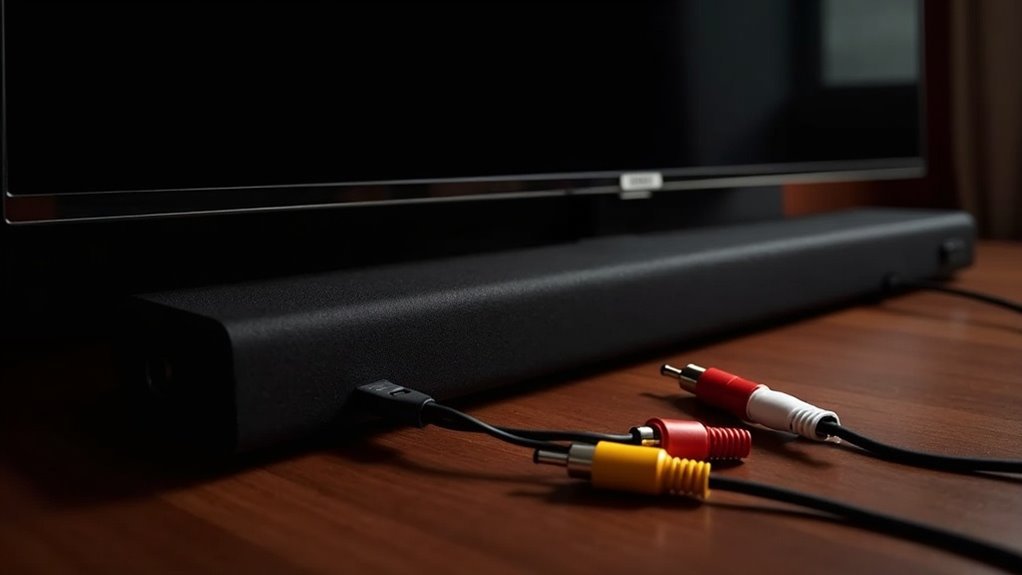
To integrate your soundbar with a powered subwoofer using RCA adapters, start by checking that both devices are compatible. Utilize high-quality RCA cables with gold-plated connectors for optimal signal quality. Connect the soundbar’s RCA output to the subwoofer’s RCA input, using a stereo 3.5mm to dual RCA adapter if necessary. Adjust the subwoofer’s crossover frequency between 80-120 Hz and balance the volume settings to prevent distortion. Following these steps will help ensure your soundbar setup delivers an impressive audio experience.
Key Takeaways
- Confirm that your soundbar has RCA audio output options compatible with your powered subwoofer’s input specifications.
- Use a stereo 3.5mm to dual RCA adapter cable if your soundbar lacks direct RCA outputs.
- Select high-quality RCA cables with gold-plated connectors to minimize noise and enhance audio clarity.
- Set the crossover frequency on your subwoofer between 80-120 Hz for optimal sound blending with your soundbar.
- Ensure all connections are secure and adjust volume levels on both your soundbar and subwoofer to avoid distortion.
Understanding RCA Connections for Soundbars and Subwoofers
When integrating a soundbar with a subwoofer, understanding RCA connections is essential for achieving ideal audio performance.
Most soundbars, such as the KatanaX, feature RCA outputs that allow for direct connections to powered subwoofers using red and white plugs for right and left channels.
It’s important to check the voltage output; some soundbars may only deliver around 2 volts, which could require a line driver to enhance the signal.
For optimal connections, consider using a stereo 3.5mm to dual RCA adapter cable, linking it to the center/sub output jack.
Lastly, be sure to adjust the audio settings on both devices to optimize the subwoofer’s function and sound quality for an enhanced listening experience.
Ensuring Compatibility Between Your Soundbar and Subwoofer
Ensuring compatibility between your soundbar and subwoofer is essential for achieving ideal audio performance.
First, check that your soundbar has RCA audio output options; some models don’t include this feature. Next, verify the voltage output of your soundbar’s RCA outputs, typically around 2 volts. If the signal is weak, consider using a line driver.
Ensure your soundbar has RCA outputs and verify the voltage for optimal connectivity with your subwoofer.
When connecting, utilize a stereo 3.5mm to dual RCA adapter cable to link the soundbar’s output to the subwoofer’s line level input.
Finally, confirm the subwoofer’s input specifications match the soundbar’s output level to prevent distortion and protect your equipment. Always follow manufacturer guidelines to ensure optimal compatibility and performance.
Choosing the Right RCA Cables for Your Setup
Choosing the right RCA cables for your soundbar setup is crucial for maintaining audio fidelity. Opt for high-quality RCA cables with gold-plated connectors to ensure superior connectivity and minimize signal loss.
If your soundbar features a 3.5mm output, consider using a stereo RCA to 3.5mm adapter for an effective connection to compatible devices. Pay attention to cable length; shorter cables help reduce noise and interference.
Additionally, select well-shielded RCA cables to protect against electromagnetic interference from other electronics. This approach will enhance audio clarity and performance, ensuring you enjoy the best sound experience from your soundbar.
Configuring Audio Settings for Optimal Performance
To achieve optimal performance from your soundbar, it’s essential to adjust the audio driver settings on your device to ensure it recognizes the soundbar as the primary audio output.
After making these adjustments, monitor and balance the volume levels to prevent distortion and enhance clarity.
Finally, conduct a sound quality test to verify that the soundbar delivers a rich and immersive audio experience.
Adjusting Volume Levels
Adjusting volume levels between your soundbar and subwoofer is essential for achieving an ideal audio experience.
Follow these steps for peak performance with your soundbar setup:
- Start with the subwoofer’s volume set low to avoid overpowering the soundbar.
- Configure your soundbar to recognize the subwoofer, selecting a suitable audio mode for 2.1 channel output.
- Set the crossover frequency on the subwoofer between 80-120 Hz to effectively blend bass with mid and high frequencies.
Regularly test and adjust the volume levels to ensure a balanced sound without distortion.
Consider using any auto-calibration features available with your soundbar for further enhancement.
Configuring Audio Drivers
Configuring audio drivers is essential for ensuring your soundbar delivers an optimal audio experience. After connecting your powered subwoofer with RCA adapters, access the audio driver settings in your operating system’s sound control panel.
Look for prompts to configure the subwoofer for peak performance, ensuring it’s recognized in your audio output system alongside the soundbar. If automatic detection fails, manually set the output to “subwoofer” or “LFE” to enhance bass response.
Aim for a 2.1 audio setup if supported, offloading low frequencies to the subwoofer for improved sound quality. Finally, re-run the initial audio configuration to confirm proper setup, ensuring both the soundbar and subwoofer work harmoniously together for an immersive listening experience.
Testing Sound Quality
While testing sound quality on your soundbar, it’s crucial to ensure that it’s calibrated for peak performance.
Follow these steps for ideal audio settings:
- Set your soundbar’s output mode to “2.1” or “subwoofer” if available.
- Adjust the subwoofer volume to a low level initially, balancing it with the soundbar’s output.
- Configure the crossover frequency around 80Hz to blend frequencies effectively.
Regularly monitor the sound quality during playback, ensuring the soundbar delivers clear audio without distortion.
If you notice any muddiness, consider adjusting the settings or the placement of your soundbar for improved clarity.
Placement Tips for Improved Sound Quality
To achieve ideal sound quality with your soundbar, the placement of your subwoofer is essential.
Consider various placement options; positioning it in a corner can enhance bass response due to boundary reinforcement. Experiment along the front wall to blend bass seamlessly with your soundbar’s output for better audio experience.
Positioning your subwoofer in a corner can boost bass response, while experimenting along the front wall enhances audio blending with your soundbar.
Avoid placing the subwoofer too close to furniture or walls that may obstruct sound waves, as unwanted resonance can muddy the sound.
Use the “subwoofer crawl” method—start at your listening position and move around to find where bass sounds best.
Ensure the subwoofer is positioned appropriately to improve clarity and enhance your overall soundstage when paired with your soundbar.
Troubleshooting Common Connection Issues
When troubleshooting connection issues between your soundbar and subwoofer, start by checking the RCA connections to ensure they’re secure.
Loose cables can lead to low or no sound output, which is a common problem with soundbars.
Next, verify the amplifier settings on both devices, as improper levels can affect overall sound quality and balance.
Check RCA Connections
A solid connection between your soundbar and subwoofer is essential for ideal audio performance, so it’s important to check the RCA connections thoroughly.
Follow these steps:
- Confirm RCA cables are securely connected to both the soundbar and powered subwoofer; loose connections can cause poor sound quality or silence.
- Verify compatibility of RCA outputs and inputs for line-level signals, checking specifications specific to soundbars.
- Monitor volume settings on both devices; improper adjustments may lead to audio imbalance or distortion, affecting your overall soundbar experience.
Verify Amplifier Settings
After confirming your RCA connections are secure, the next step is to verify the amplifier settings, as they play an essential role in the performance of your soundbar and subwoofer system. Make sure the amplifier is powered on and the correct input source is selected. Check volume levels for both the amplifier and soundbar. If sound output is low, inspect for interference and confirm RCA connections. Additionally, assess audio driver settings to ensure the subwoofer is recognized. If using an adapter cable or line driver, verify they’re set correctly to enhance signal strength.
| Setting | Action | Notes |
|---|---|---|
| Input Source | Select Correct Input | Ensure it matches soundbar device |
| Volume Level | Adjust Levels | Both amplifier and soundbar |
| Audio Configuration | Assess Detection | Rerun if subwoofer isn’t found |
Enhancing Your Setup With Additional Equipment
Integrating additional equipment like a powered subwoofer can significantly enhance your soundbar experience.
To optimize your setup, consider these key factors:
- Connection Compatibility: Use a stereo 3.5mm to dual RCA cable, making sure that your soundbar’s output voltage aligns with the subwoofer’s line level input for seamless connectivity.
- Adjustable Settings: Check if your powered subwoofer has crossover and level controls. This allows you to balance the bass effectively, ensuring it complements rather than overpowers your soundbar.
- Placement Experimentation: Try different subwoofer placements in your room to improve sound distribution, leading to a fuller and more immersive audio experience.
Always keep an eye on volume levels to prevent distortion or potential damage to your equipment.
Exploring Alternative Connection Options for Flexibility
While traditional connections are common, exploring alternative options can significantly enhance flexibility when integrating a soundbar with a powered subwoofer.
You might consider using speaker wires for high-level connections, although this requires an understanding of your soundbar’s internal wiring to avoid potential damage.
Additionally, opting for a wireless subwoofer can help eliminate cable clutter and simplify your setup.
Aftermarket subwoofers equipped with HDMI inputs can also offer a hassle-free connection without altering your existing configurations.
Finally, utilizing optical/RCA DAC converters allows you to adapt your devices easily, ensuring optimal performance without extensive modifications to your soundbar setup.







