If you’re looking for the best audio splitters with optical passthrough to enhance your soundbar experience, you can’t go wrong with options like Avedio Links Optical Audio Splitter 1 in 2 Out and NEWCARE Optical Audio Splitter 1 in 3 Out.
These devices support high-quality audio formats and offer seamless connectivity to multiple soundbar setups.
BlueRigger Digital Optical Audio Splitter 1×2 and the VPFET HDMI Audio Extractor are also excellent choices for robust sound performance.
Want to discover more about these fantastic options for optimizing your soundbar?
avedio links Optical Audio Cable Splitter 1 in 2 Out

If you’re looking to enhance your soundbar setup with versatile connectivity, the Avedio links Optical Audio Cable Splitter is an excellent choice. This splitter features one male input and two female outputs, supporting LPCM 2.0, Dolby Digital, and DTS formats, making it perfect for soundbars. You can easily connect your soundbar and a headset simultaneously, enjoying individual volume controls for a tailored audio experience. With a transmission distance of up to 150 feet, it maintains minimal signal loss, ensuring your sound quality remains top-notch. Plus, its plug-and-play design makes installation quick and hassle-free. Just remember, only one device’s optical output should be active at a time to avoid potential issues. Enjoy seamless audio experiences with this reliable splitter!
Best For: Soundbar enthusiasts who want to connect multiple audio devices while maintaining optimal sound quality.
Pros:
- Supports multiple audio formats including LPCM 2.0, Dolby Digital, and DTS for versatile compatibility with soundbars.
- Easy plug-and-play installation with no noticeable loss in audio quality.
- Allows simultaneous use of a soundbar and a headset with separate volume controls, enhancing user experience.
Cons:
- Only one device’s optical output can be active at a time, which may limit usage.
- Some users have reported discrepancies in product descriptions, such as length issues.
- Caution is advised when using long Toslink cables, as it may lead to signal degradation.
1×2 Digital Audio Splitter, Toslink Digital Fiber Optic Audio Splitter

The x2 Digital Audio Splitter, Toslink Digital Fiber Optic Audio Splitter, is an excellent choice for soundbar enthusiasts, providing the capability to connect two soundbars simultaneously from a single optical port. It supports various audio setups, ensuring you can enjoy your favorite content with independent volume control. You’ll appreciate its Hi-Fi sound quality, with minimal signal loss and an impressive distance of up to 150ft. Built with durable materials, it’s compatible with a range of devices including TVs and media players. Plus, friendly customer support is available to assist with any inquiries you may have.
Best For: Soundbar enthusiasts looking to connect multiple audio devices from a single optical port.
Pros:
- Hi-Fi sound quality with minimal signal loss, ensuring an outstanding audio experience.
- Supports independent volume control for connected soundbars, allowing for tailored listening preferences.
- Durable construction with corrosion-resistant materials and gold-plated connectors for enhanced longevity.
Cons:
- Occasional signal coordination issues reported with some soundbar models.
- Some users noted concerns about durability after extensive use.
- Limited compatibility with certain older audio equipment may impact performance.
VPFET HDMI Audio Extractor 4K Adapter Splitter Converter

For those seeking to elevate their audio experience without compromising video quality, the VPFET HDMI Audio Extractor 4K Adapter Splitter Converter is an excellent choice for soundbar enthusiasts. This device converts HDMI signals into audio outputs via optical or 3.5mm AUX, supporting multiple audio modes, including 5.1CH for optical. It’s compatible with a variety of HDMI devices like Blu-ray players and gaming consoles, making it ideal for extracting audio to enhance your soundbar setup. Users commend its reliable sound quality, ensuring your audio remains clear and vibrant. Just keep in mind it doesn’t support ARC devices or 7.1 channels, so be sure to check compatibility with your soundbar beforehand.
Best For: Users looking to extract high-quality audio from HDMI devices for use with soundbars, especially those with older audio systems.
Pros:
- Supports multiple audio modes, including 5.1CH for optical output and 2.0CH for stereo, enhancing soundbar performance.
- Compatible with various HDMI devices, such as Blu-ray players and gaming consoles, improving audio output to your soundbar.
- Reliable sound quality, ensuring digital audio is transmitted accurately without degradation.
Cons:
- Does not support 7.1 channels, limiting maximum output to 5.1 channels, which may affect some soundbar setups.
- Compatibility issues may arise with certain devices, particularly those requiring specific audio formats.
- Not compatible with ARC/eARC devices, limiting its use with modern TVs as input sources for soundbars.
NEWCARE Optical Audio Splitter 1 in 3 Out

Looking to enhance your soundbar experience with multiple audio devices without sacrificing sound quality? The NEWCARE Optical Audio Splitter 1 in 3 Out allows you to connect one optical fiber input to three output devices effortlessly, making it a great addition to your sound setup. It supports LPCM2.0, Dolby Digital, and DTS 5.1 formats, ensuring high-quality audio transmission up to 40 meters. Users appreciate its automatic balance system, which prevents loss or delay while connecting devices like soundbars and media players. However, some may face minor installation issues with the USB cable and optical connections. Still, with a satisfaction guarantee, you can enjoy flexibility in your soundbar configuration confidently.
Best For: Soundbar enthusiasts looking to connect multiple optical audio devices without compromising sound quality and requiring a reliable splitter for various audio setups.
Pros:
- Supports multiple audio formats including LPCM2.0, Dolby Digital, and DTS 5.1 for versatile use with soundbars.
- Automatic balance system ensures signal transmission without loss or delay, enhancing your audio experience.
- Compact design allows for easy placement in tight spaces, maintaining a clean aesthetic alongside your soundbar.
Cons:
- Some users may encounter installation challenges with the USB cable and optical connections.
- A few reports of receiving faulty units, leading to frustration with no output signal.
- Limited to optical audio formats, with no support for HDMI audio or advanced formats like Atmos, which may affect high-end soundbar setups.
BlueRigger Digital Optical Audio Splitter 1×2

Designed for soundbar enthusiasts and home theater aficionados, the BlueRigger Digital Optical Audio Splitter 1×2 provides an effortless solution for enjoying high-quality sound. This unidirectional Toslink splitter takes one optical audio input and divides it into two outputs, making it ideal for connecting your TV to both a soundbar and an A/V receiver. It supports various audio formats, including LPCM2.0 and DTS 5.1, ensuring compatibility with your soundbar and other devices. Installation is simple with its plug-and-play setup, and the sturdy construction optimizes signal fidelity. Plus, with a lifetime warranty, you can elevate your audio experience with complete peace of mind.
Best For: Soundbar users and home theater enthusiasts looking to connect multiple audio devices effortlessly.
Pros:
- Supports a range of audio formats, including LPCM2.0, Dolby Digital, and DTS 5.1, ensuring compatibility with most sound systems.
- Straightforward plug-and-play installation with secure connections for a hassle-free setup.
- Built with high-quality materials and a lifetime warranty for lasting reliability.
Cons:
- As a passive splitter, it may lead to reduced signal strength when splitting audio between two outputs.
- For optimal performance, Fiber Optic Toslink cables should ideally be less than 10 ft in length.
- Sound issues may occur if connections are not secure, which may require customer support for troubleshooting.
avedio links Optical Audio Cable Splitter 1 in 2 Out
The Avedio Links Optical Audio Cable Splitter 1 in 2 Out is an excellent choice for soundbar enthusiasts who want to connect multiple devices without compromising audio quality. With one male input and two female outputs, it supports LPCM 2.0, Dolby Digital, and DTS formats. This allows you to connect a soundbar and a headset simultaneously, enjoying separate volume controls for each. Its plug-and-play setup simplifies installation, and it maintains audio quality over distances up to 150ft. While it’s not a combiner, the robust construction and gold-plated connectors ensure optimal signal transfer. Additionally, friendly customer support is available to assist with any inquiries or concerns.
Best For: Soundbar users looking to connect multiple audio devices without sacrificing sound quality.
Pros:
- Plug-and-play design for straightforward installation and setup.
- Supports various audio formats, including LPCM 2.0, Dolby Digital, and DTS.
- Enables simultaneous use of two devices with independent volume controls.
Cons:
- Not intended as a combiner; only one optical output device should be active at a time.
- Some users have reported inconsistencies in product descriptions, such as discrepancies in length.
- Caution is recommended when using with long Toslink cables to avoid potential signal degradation.
Digital Optical Audio Splitter (1 in 2 Out)
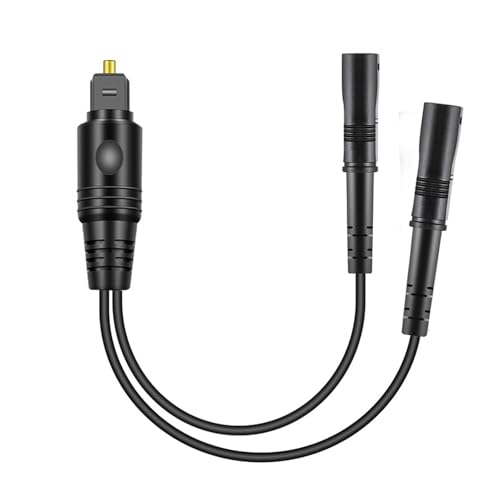
For soundbar enthusiasts seeking seamless audio distribution, the Digital Optical Audio Splitter (1 in 2 Out) is an ideal solution. This device connects one optical input to two outputs, allowing you to enjoy high-quality sound from your soundbar, gaming console, or Blu-ray player. With minimal signal loss and support for uncompressed PCM audio and surround sound systems, your audio experience remains exceptional. Its plug-and-play design guarantees easy setup with various devices. Just keep your optical cable length under 10 feet for peak performance. If you encounter issues, reaching out to support is recommended for troubleshooting.
Best For: Soundbar users looking for a reliable way to distribute high-quality audio from one optical input to multiple devices.
Pros:
- Hi-Fi sound quality with minimal signal loss, supporting advanced audio formats such as Dolby Digital Plus and DTS-HD.
- Plug-and-play design allows for easy setup with a wide range of devices like soundbars, gaming consoles, and Blu-ray players.
- Supports long output distances up to 150ft, making it versatile for various home theater setups.
Cons:
- Signal strength may weaken when divided between two outputs, potentially affecting sound quality.
- For optimal performance, output fiber optic cables should be kept under 10 feet, limiting setup flexibility.
- Users may need to contact support for troubleshooting sound issues, which could be inconvenient.
Factors to Consider When Choosing an Audio Splitter With Optical Passthrough
When selecting an audio splitter with optical passthrough for your soundbar setup, there are several crucial factors to consider. First, ensure compatibility with your soundbar and other devices. Next, check the audio formats supported by the splitter to guarantee optimal performance. It’s also essential to evaluate how well the splitter preserves signal quality, as this can significantly affect your listening experience. Additionally, consider the ease of installation and the length of the cables, as these elements can influence the overall functionality of your soundbar system.
Compatibility With Devices
Choosing the right audio splitter with optical passthrough is crucial for ensuring compatibility with soundbars and other audio devices. Make sure the splitter works seamlessly with your soundbar, game consoles, Blu-ray players, and HDTVs for optimal performance. Check that it supports the audio formats your devices use, including LPCM 2.0 and Dolby Digital, as well as surround sound systems up to 7.1 channels. Look for a model that allows simultaneous connections to multiple audio outputs, so you can enjoy your soundbar and headsets with independent volume control. Additionally, confirm the splitter’s transmission distance capabilities, especially if you’re using long optical fiber cables, to maintain high audio quality without any signal loss. Finally, ensure it’s plug-and-play for a hassle-free setup.
Audio Formats Supported
Verifying your soundbar supports the right audio formats is crucial for maximizing your sound experience. Look for support for essential formats like LPCM 2.0, Dolby Digital, and DTS, which are staples in modern audio systems. If you’re aiming for a surround sound setup, choose a soundbar that accommodates higher channel configurations, ideally up to DTS 5.1 or 7.1. It’s also important to check for compatibility with uncompressed PCM audio and advanced formats like Dolby Digital Plus and DTS-HD. Additionally, consider the maximum output signal distance; many soundbars effectively transmit audio over considerable distances without significant quality loss. Prioritizing these factors will guarantee you enjoy the best audio performance from your sound system.
Signal Quality Preservation
To preserve signal quality while using a soundbar with optical passthrough, you must consider several key factors that impact audio performance. First, ensure that your soundbar supports low signal loss, ideally less than 0.2dB per meter, to maintain high-quality transmission over longer distances. Look for compatibility with uncompressed LPCM audio and surround sound formats like DTS and Dolby Digital to enhance your listening experience. If your setup requires longer cable runs, choose a soundbar that can handle signals up to 150 feet without degradation. Pay attention to the construction quality; gold-plated connectors and solid PVC outer layers can significantly enhance signal integrity. Finally, prefer soundbars with active passthrough features over those with passive ones to avoid weakened audio, especially in complex setups where ideal sound quality is essential.
Installation Ease
When setting up your soundbar system, the ease of installation for an audio splitter with optical passthrough can significantly enhance your overall experience. Look for a plug-and-play design that allows for a quick setup without the need for additional software or complicated configurations. It’s crucial to ensure that the splitter has clearly labeled input and output ports, making connections straightforward and avoiding any confusion. Check user feedback on the product’s installation ease; positive reviews often indicate that most users can set it up without technical expertise. Additionally, consider a splitter that supports various audio formats to ensure compatibility with your soundbar and other devices. Finally, keep in mind any specific installation recommendations to optimize performance and prevent signal degradation.
Length of Cables
Choosing the right length for your optical cables can make all the difference in audio quality when connecting your soundbar. The maximum recommended distance for optical fiber cables is 150 feet to minimize signal loss, but keeping your Toslink cable under 10 feet is ideal for peak performance with your soundbar. Longer cables can lead to signal degradation, making it crucial to use powered splitters if you must go longer. Be cautious about mismatched cable lengths, as these can weaken signals and affect audio quality, especially in a soundbar setup. Additionally, verify tight connections and avoid bending cables excessively during installation. By paying attention to cable length, you can enhance your soundbar experience greatly and prevent common issues like audio dropouts.
Number of Outputs
The number of outputs in an audio splitter is crucial for your soundbar setup, as it determines how many devices you can connect at once. Typically, you’ll find options ranging from one input to two or more outputs. For optimal performance, consider a splitter with multiple outputs, such as a 1 in 3 out configuration, which allows you to connect various audio devices like soundbars and headphones simultaneously. Keep in mind that each additional output may reduce signal strength, so seek out a splitter that ensures high fidelity, ideally with less than 0.2dB loss per meter of cable. Also, make sure it supports necessary audio formats, such as LPCM, Dolby Digital, and DTS, across all outputs for a seamless sound experience with your soundbar.
Power Requirements
Understanding power requirements is key for selecting a soundbar with passthrough capabilities. Some soundbars operate passively and don’t need external power, while others require a power source, especially if they support multiple outputs. Active soundbars offer better sound quality and clarity over longer distances, but passive models might struggle with signal degradation on long audio cables. When choosing a soundbar, consider the availability of power sources in your setup; some models may need a USB port or wall adapter. Always check the manufacturer’s specifications for power needs to verify compatibility with your audio equipment and prevent operational issues. Selecting the right power option can greatly enhance your audio experience.
Warranty and Support
When selecting a soundbar with optical passthrough, it is crucial to take into account the warranty and support offered by the manufacturer. Look for products that include a satisfaction guarantee or replacement for defects, providing you peace of mind. Consider brands that promise responsive customer support, ideally within a specified timeframe, which can be invaluable for troubleshooting. Some manufacturers offer lifetime warranties, showcasing their confidence in build quality and durability—this can greatly influence your purchasing decision. Additionally, reading customer reviews about support experiences can give you insight into the effectiveness of the assistance provided. Understanding warranty coverage, including what damages or issues are included, helps you make informed choices about the longevity and reliability of your soundbar.







