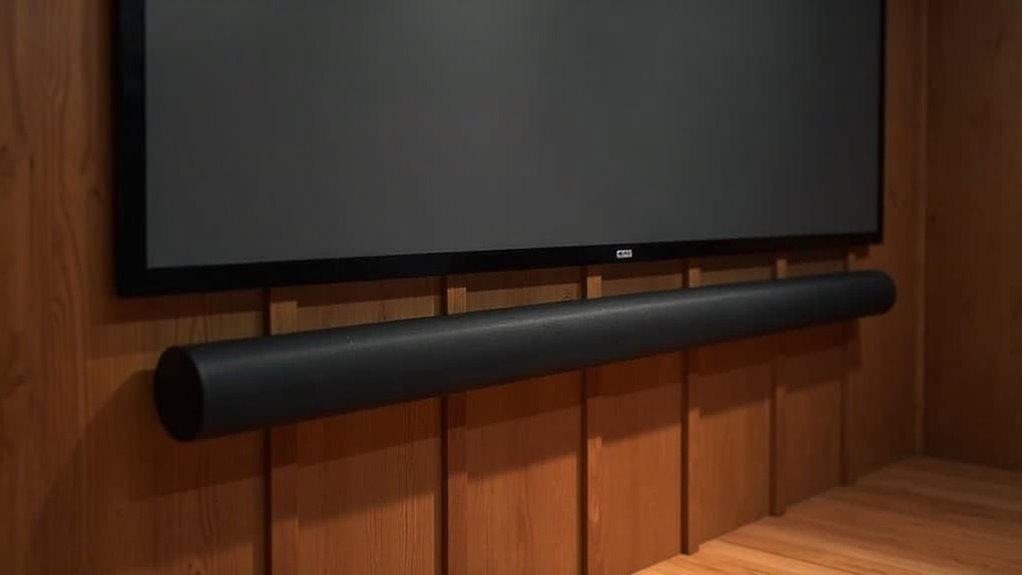
To mount your soundbar under a projector screen frame, first ensure it’s positioned at ear level, which is approximately 42.5 inches from the floor. Utilize a robust wall mount that can support the weight of your soundbar and consider using spacers for sufficient clearance. Connect the soundbar with a high-quality HDMI cable to achieve optimal audio performance. Make sure the soundbar does not obstruct the projector screen and use cable raceways to conceal any wiring for a clean look. Interested in maximizing your audio experience? Explore more tips on getting the best out of your soundbar.
Key Takeaways
- Position the soundbar at ear level, approximately 42.5 inches off the floor for optimal audio experience while enjoying your favorite movies and shows.
- Use a sturdy wall mount designed specifically for soundbars that supports its weight, and consider adding spacers for precise alignment.
- Make sure the soundbar is mounted in a way that it does not obstruct the projector screen, ensuring an unobstructed viewing experience for all your entertainment needs.
- Conceal any wiring using cable raceways to maintain a clean and organized look in your home theater setup.
- Connect the soundbar to your projector system using a high-quality HDMI cable to ensure superior audio quality and performance for a fully immersive experience.
Choosing the Right Soundbar for Your Projector
When you’re setting up your projector system, choosing the right soundbar is crucial for achieving optimal audio quality.
Begin by ensuring the soundbar has compatible ports such as HDMI or optical for seamless connections to your projector.
Opt for a soundbar with a higher channel count, ideally 5 or 7 channels, to significantly enhance the surround sound experience.
Look for advanced features like Dolby Atmos or upward-firing speakers to create immersive audio that perfectly complements your projector’s visuals.
Additionally, consider soundbars equipped with built-in Bluetooth or Wi-Fi capabilities for convenient wireless connections.
Research user reviews and expert recommendations to find quality soundbar options within your budget, typically starting around $300.
Preparing for Soundbar Installation
To guarantee a successful soundbar installation beneath your projector screen, start by confirming the screen’s lowered height aligns with ideal audio placement, which should be about one-third below the seated eye level.
Ensure the projector screen’s height aligns with audio placement, ideally one-third below the seated eye level for optimal sound.
Measure from the ceiling to your chosen mounting location, ensuring the soundbar fits and any spacers provide necessary clearance.
Select a mounting bracket that supports the soundbar’s weight and is compatible with its design.
Plan your wiring route for power and audio connections, utilizing cable raceways to conceal cables and minimize hazards.
Finally, verify the soundbar’s connectivity options, ensuring the right HDMI cable or alternative is used for optimal compatibility.
Mounting the Soundbar Under the Projector Screen
Mounting your soundbar under the projector screen is essential for achieving optimal audio performance. For the best sound quality, position the soundbar at ear level when seated, ideally around 42.5 inches off the floor.
Use a sturdy wall mount rated for your soundbar’s weight, and consider using spacers for adequate clearance. Ensure that the soundbar doesn’t obstruct the projector screen, with the ideal position keeping one-third of it below eye level for an enhanced viewing experience.
- Connect your soundbar using a high-quality HDMI cable to ensure superior audio quality.
- Conceal any wiring with cable raceways for a clean and organized look.
- Test the placement with various audio sources to ensure excellent sound dispersion and performance.
Connecting the Soundbar to Your Projector
To connect your soundbar to the projector, begin by examining the available audio output ports such as HDMI ARC, optical, or RCA.
Select the appropriate cable type for your setup; for example, an HDMI cable provides superior audio quality, while optical connections deliver high fidelity with minimal interference.
If you prefer a wireless connection, ensure both devices are compatible and in pairing mode, but keep in mind that this option may affect audio quality.
Connection Port Options
Before connecting your soundbar to your home entertainment system, it’s essential to check for compatible ports on both devices to ensure a smooth audio experience.
Here are the key connection options you’ll want to consider:
- HDMI port: This is the preferred choice for audio and video, particularly if your soundbar supports HDMI ARC, allowing for a single-cable connection that simplifies setup.
- Optical cable: This option provides reliable high-fidelity audio with minimal interference. Be sure to invest in a quality optical cable for the best results.
- RCA connections: While these can be used for older devices, keep in mind that they typically deliver lower audio quality compared to digital connections.
Selecting the most suitable method for connecting your soundbar will help ensure superior audio output for your home entertainment setup.
Cable Types Explained
Understanding the various cable types available for connecting your soundbar to a projector is essential for achieving peak audio performance.
HDMI ports are the top choice, providing high-quality audio and video transmission, including surround sound formats like Dolby Atmos.
If your devices lack HDMI ports, optical (SPDIF) cables serve as a reliable alternative, delivering high-fidelity sound with minimal interference.
For older projectors, an RCA cable offers an analog option, though with lower audio quality.
While a 3.5mm auxiliary cable can work, it typically doesn’t match the sound quality of HDMI or optical connections, which are preferred for a superior soundbar experience in your home theater setup.
Wireless Setup Considerations
When connecting a wireless soundbar to your projector, it’s crucial to ensure that both devices support either Bluetooth or Wi-Fi for seamless integration.
Check your projector’s specifications to confirm it can handle wireless audio output. After enabling Bluetooth on both devices, set the soundbar in pairing mode and search for it from the projector’s settings.
To optimize your wireless soundbar setup, consider the following:
- Choose soundbars with low-latency codecs for improved audio synchronization.
- Test the connection in your intended setup location to assess signal strength.
- Ensure that obstacles don’t hinder sound performance or audio quality.
Configuring Audio Settings for Optimal Performance
To achieve the finest audio experience from your soundbar, start by utilizing its auto-calibration feature, which adjusts settings based on your room’s acoustics and speaker placement. Next, ensure your soundbar is configured to the correct input source, whether HDMI, optical, or Bluetooth, to prevent any audio output issues. Experiment with audio presets like movie or music mode for a more tailored sound experience. If necessary, you can also adjust the bass and treble levels manually to fine-tune the sound to match your room’s acoustics. Finally, make it a habit to regularly check for firmware updates, as these updates can enhance audio performance and resolve any bugs that may arise.
| Action | Purpose |
|---|---|
| Use auto-calibration | Adjusts settings to room acoustics |
| Configure correct input | Prevents audio output issues |
| Adjust bass/treble levels | Fine-tunes sound to match acoustics |
Troubleshooting Common Installation Issues
Even the best soundbar installation can run into issues, so it’s vital to know how to troubleshoot common problems with soundbars.
Even top-notch soundbar setups can face challenges, making troubleshooting essential for optimal performance.
First, verify that the mount option is secure and that your soundbar is level; an uneven installation can affect audio output.
Next, double-check all cable connections—make sure they’re fastened and not damaged. If you’re using a wireless soundbar, ensure a stable Bluetooth or Wi-Fi connection to avoid dropouts.
Finally, test the audio output to confirm functionality and check for sync issues with your connected devices.
- Confirm mounting brackets for your soundbar are secure.
- Inspect all cable connections related to the soundbar.
- Test audio output from the soundbar for clarity.







